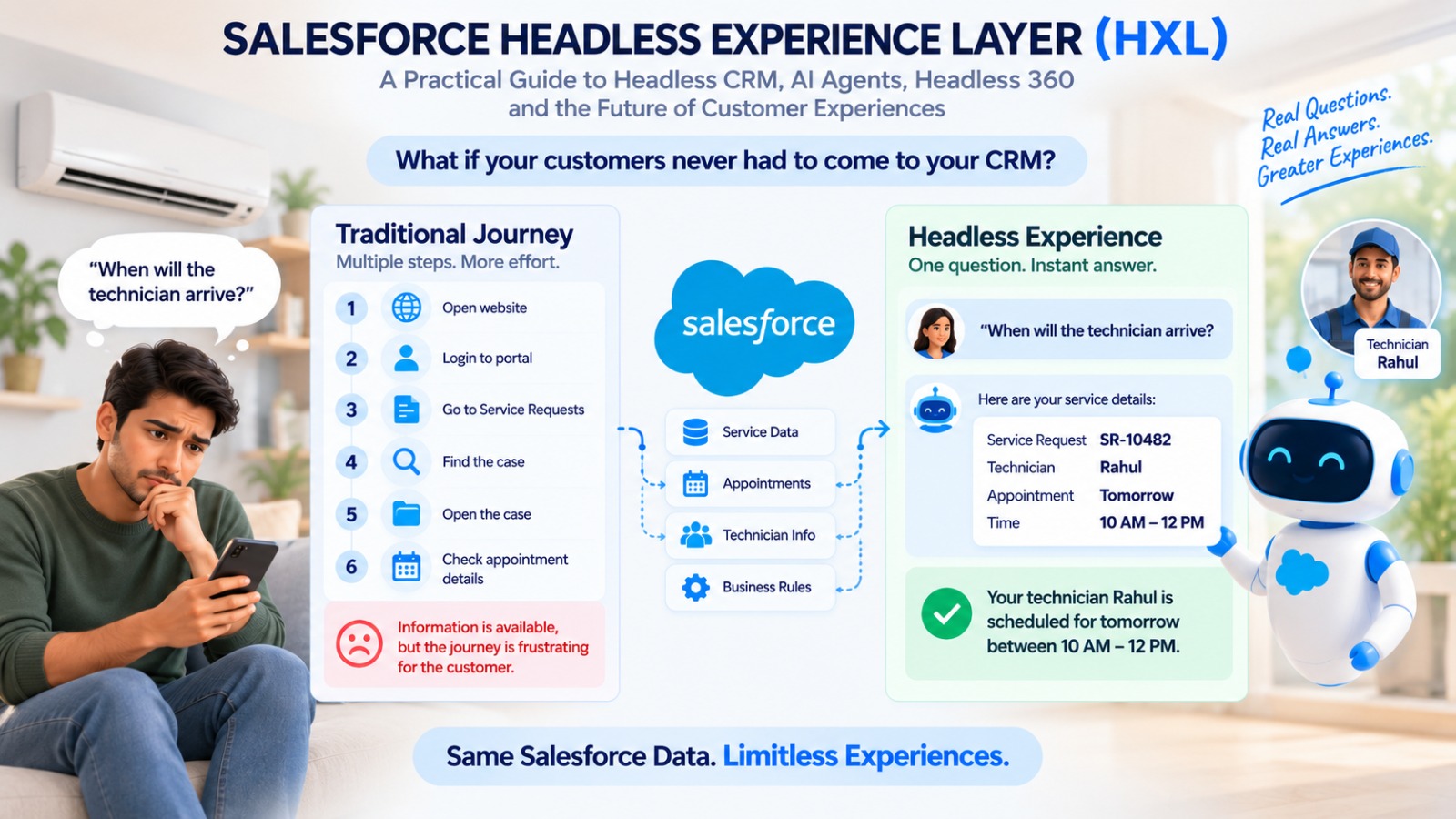
Imagine a customer who bought an air conditioner from your company two days ago. They have one simple question: “When will the technician arrive?”
Everything needed to answer it already lives in your CRM: the service request, the appointment, the technician details, and the business rules. Yet to find it, the customer still has to open your website, log in, find their service requests, locate the right case, open the record, and finally check the appointment details.
The information is available. The problem is the journey.
Now imagine a different experience. The customer simply asks the question, and an AI-powered experience understands the intent, calls the relevant Salesforce capability, applies the required business rules, and replies:
Service Request: SR-10482
Technician: Rahul
Appointment: Tomorrow, 10 AM – 12 PM
The customer gets the answer without knowing anything about Salesforce objects, fields, records, or screens.
That is the promise of headless CRM. And within Salesforce’s broader headless strategy, the Salesforce Headless Experience Layer (HXL) focuses on building reusable experiences that work across supported surfaces.
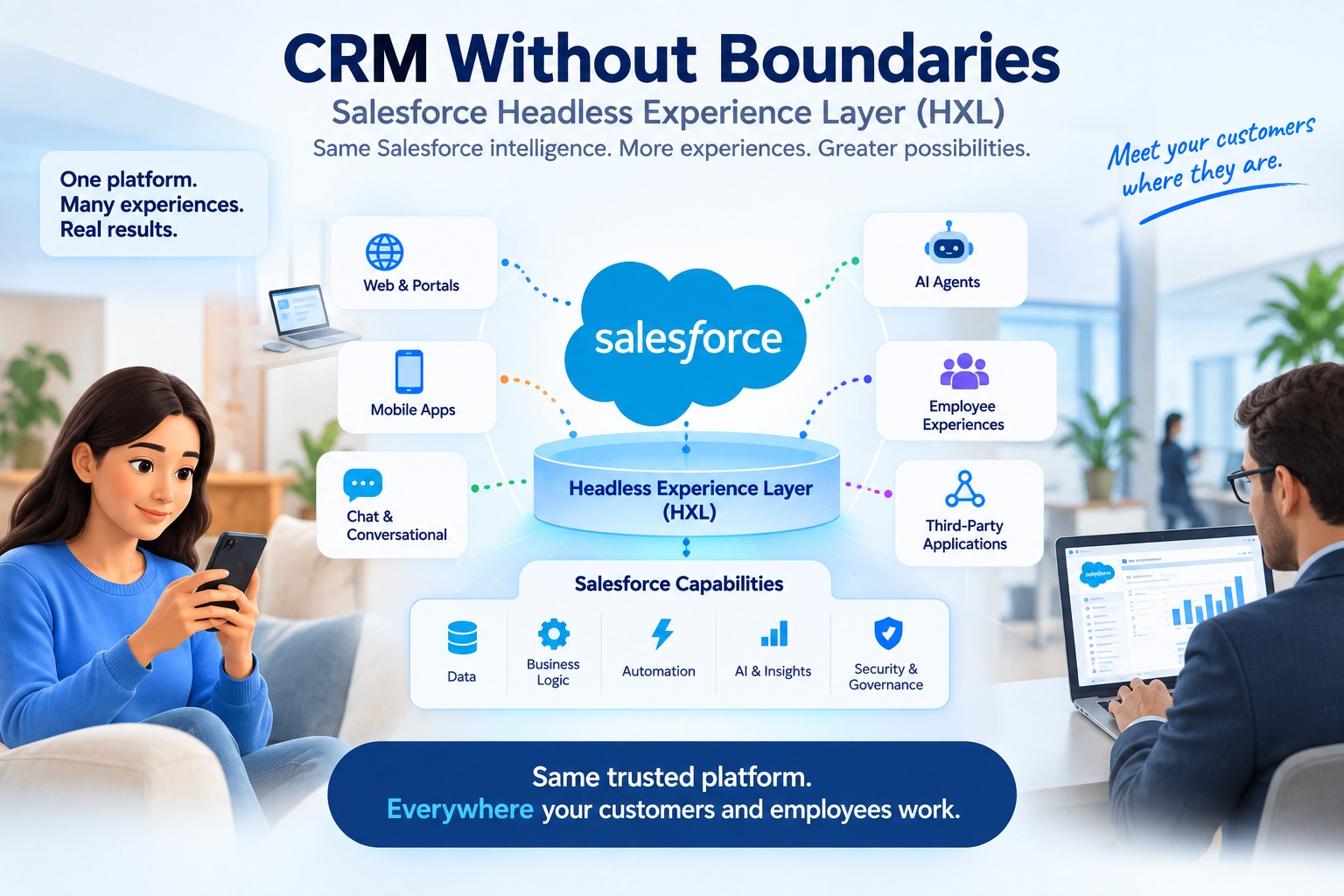
Alt text: Salesforce Headless 360 and HXL connecting Salesforce capabilities to modern digital experiences
In a traditional CRM, the user interface and the business capability are tightly linked. The user opens an application, navigates through screens and records, finds the information, and performs an action. This model works well for many use cases.
But most businesses now run many experiences at once: customer websites, mobile apps, AI assistants, conversational interfaces, employee tools, and third-party applications. That raises an architectural question: should every one of those experiences build and maintain its own version of the same business capability?
A headless approach says no. Instead of making one interface the only way in, the capability is made available to many experiences through APIs, agents, experience layers, and integrations.
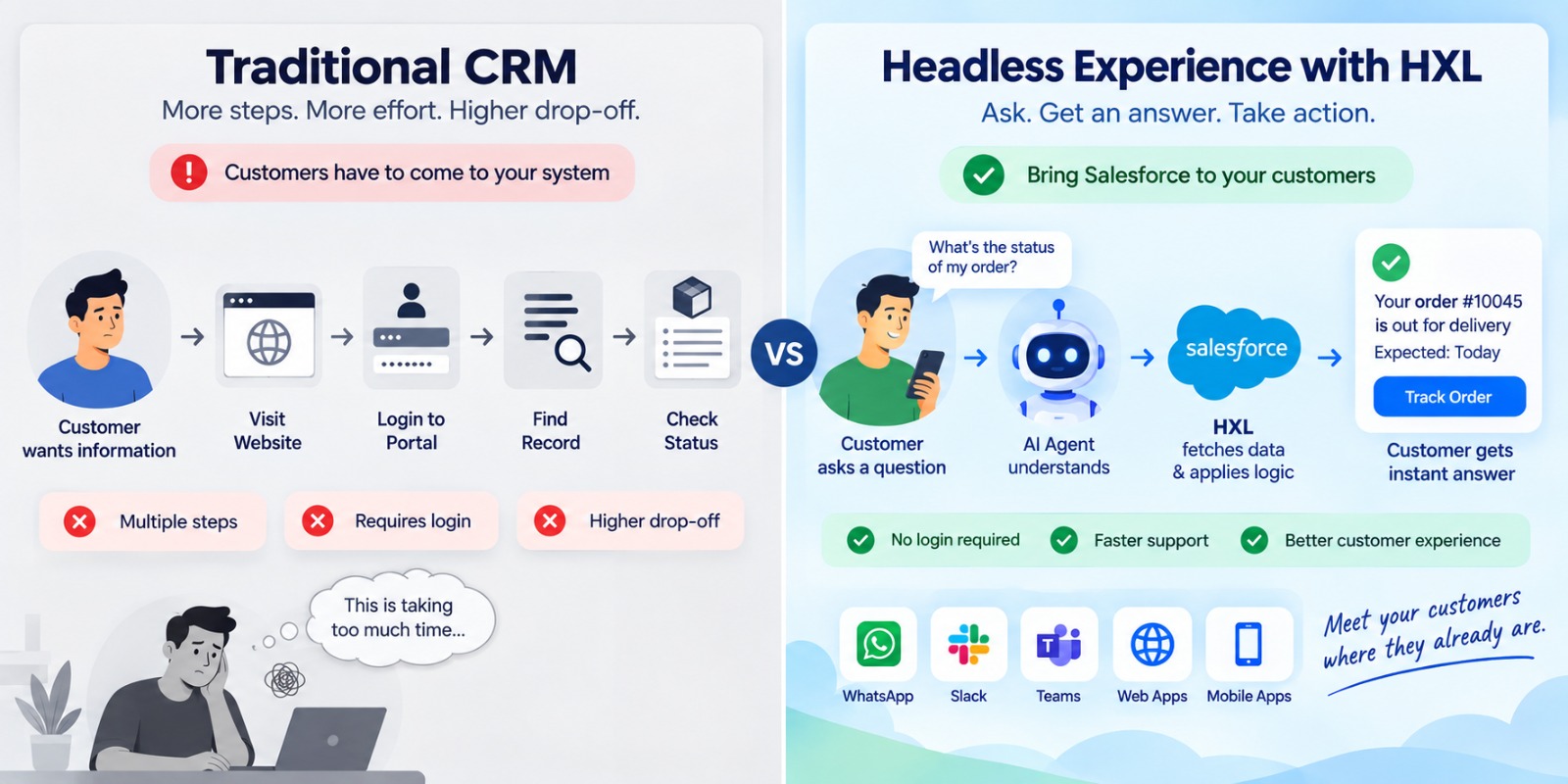
Traditional CRM: Customer → Salesforce UI → Business Logic → Salesforce Data
Headless CRM: Customer / Employee / AI Agent → Experience Surface → HXL → Business Logic + AI → Salesforce Data
The key point: headless does not mean Salesforce disappears.
Salesforce still provides the data, business logic, automation, security, and governance. Lightning Experience doesn’t go away either. What changes is how those capabilities reach the user, since the experience becomes loosely coupled from the capability underneath it.
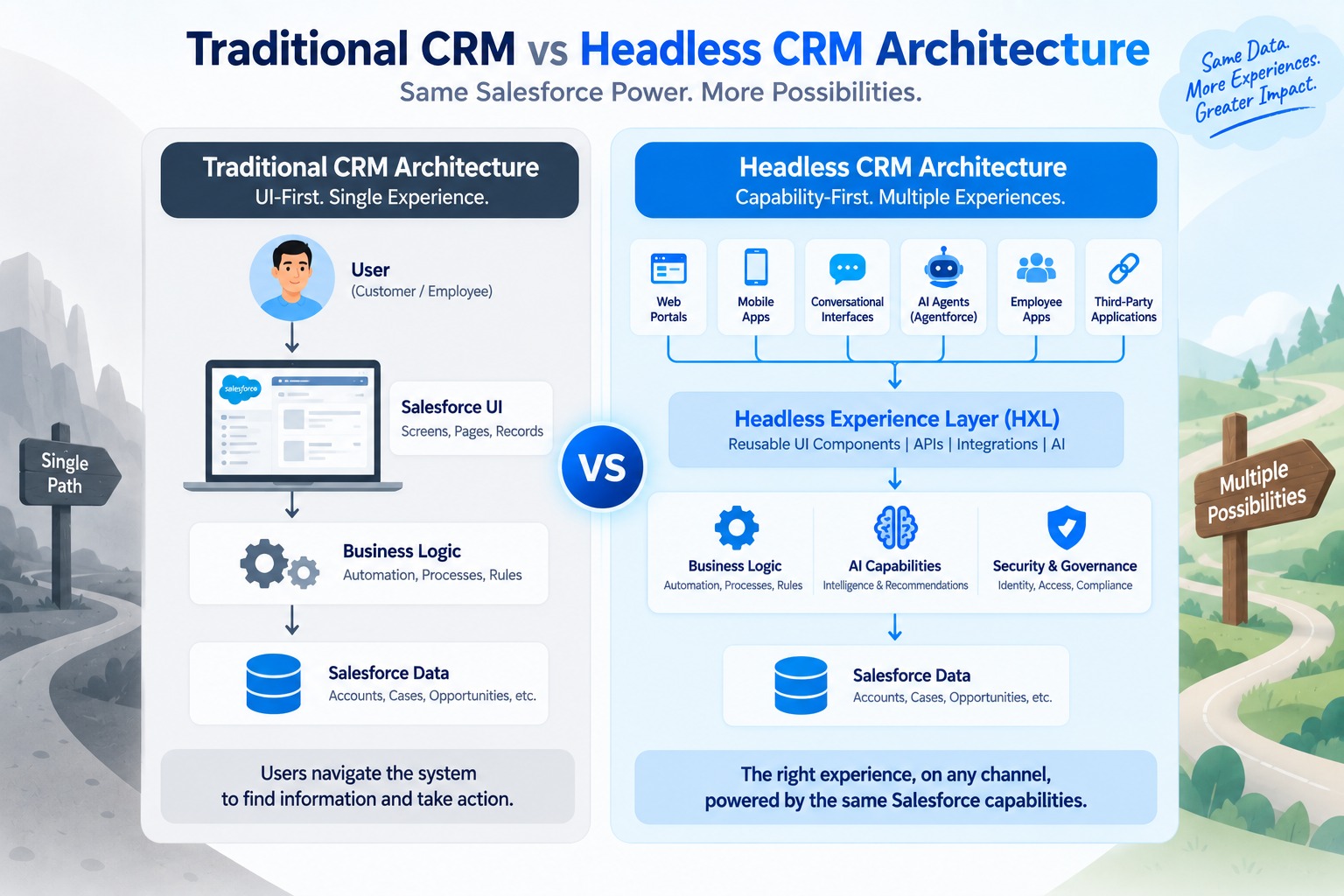 Alt text: Traditional CRM versus Salesforce Headless CRM architecture using HXL and Salesforce business capabilities
The easiest way to see the value of headless architecture is to stop thinking about screens and start thinking about user intent.
A customer doesn’t think “I need to navigate to the Case object.” They think “Where is my technician?” A sales rep doesn’t think “I need to update a record.” They think “Move this opportunity to the next stage.” An employee doesn’t think “I need to query three objects.” They think “Show me the high-priority customers I need to contact today.”
In a traditional CRM, the user navigates the system. In a headless experience, the system responds to the user’s intent.
Go back to our air-conditioner customer. The traditional journey takes six steps: open the website, log in, open service requests, find the case, open it, and check the appointment. The customer gets there eventually, but only after navigating a system to find information the business already had.
In the headless version, the customer asks, the experience interprets the request, Salesforce identifies the relevant service record, business rules determine what can be shared, and the answer comes back in one step. The technology underneath can be complex. The experience should feel simple.
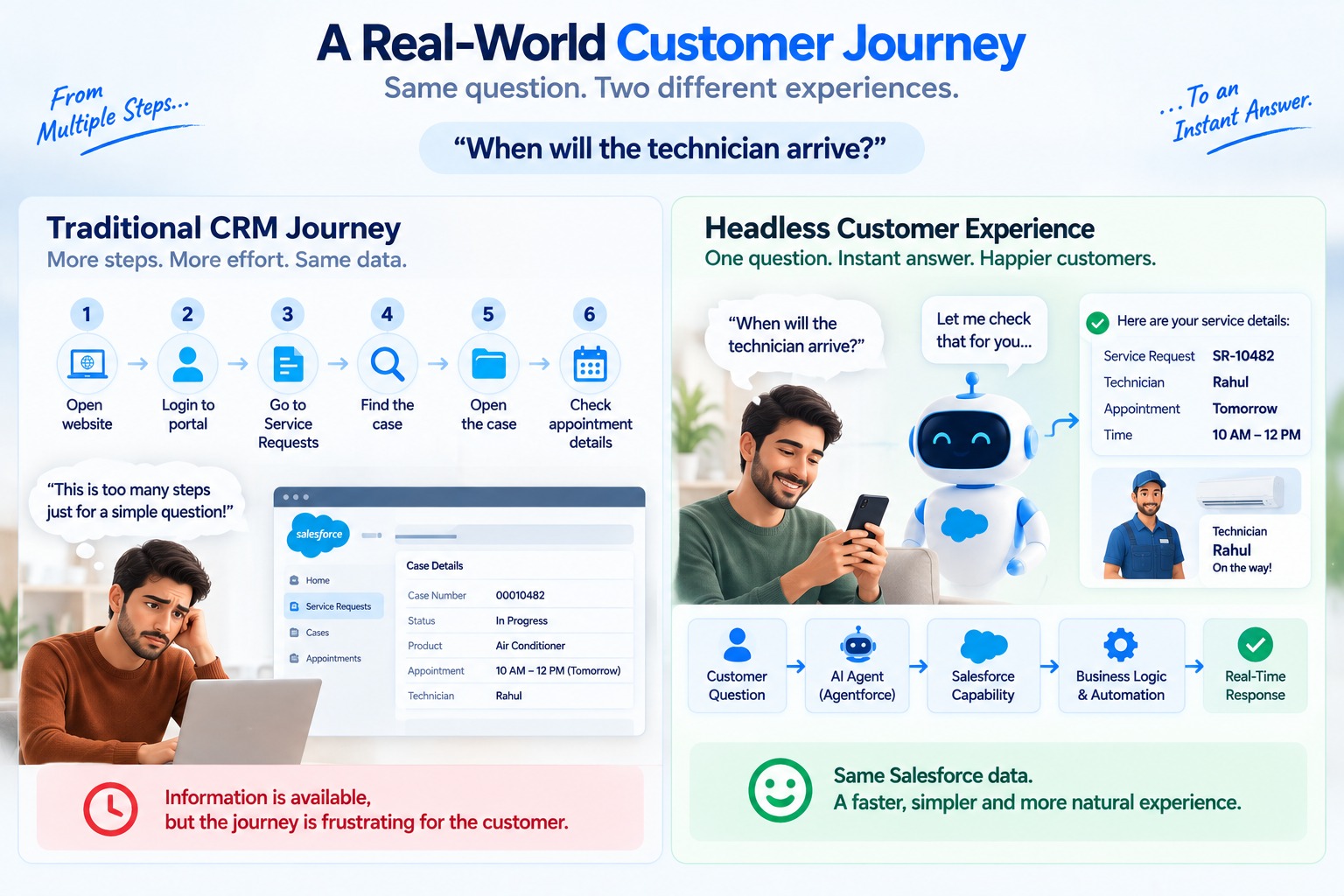
Alt text: Traditional CRM navigation versus AI-powered headless customer experience for service appointment information
HXL is designed to provide a reusable experience layer for building rich user interfaces across supported surfaces. The core idea is to separate the experience from the underlying business capability, so developers can create reusable UI compositions instead of rebuilding the presentation layer for every channel.
Salesforce describes HXL around a “write once, run anywhere” concept: HXL widgets can be built once and deployed across supported surfaces such as Agentforce, ChatGPT, Claude, and Slackbot. That makes it especially relevant for organizations exploring AI-powered, conversational, and composable experiences.
The central concept in HXL is the rich UI widget, a reusable building block for experiences. Salesforce documents widgets as platform-independent UI compositions with their own configuration and schema.
A service company, for example, might build a Service Appointment Widget showing the service request number, technician, date, time window, and status. Other common candidates include customer information, order summary, case status, product recommendation, and action confirmation widgets.
The goal is to build structured experiences once and reuse them, rather than treating every interface as a separate implementation.
Suppose a customer asks an AI agent, “Show me my open service requests.” A traditional chatbot returns a block of text. A structured experience can return something far more useful:
| Service Request | Status | Technician | Appointment |
|---|---|---|---|
| SR-10482 | Confirmed | Rahul | Tomorrow |
| SR-10491 | In Progress | Amit | Friday |
The shift is from AI → Text to AI → Business Capability → Structured Experience. The AI agent understands intent, Salesforce supplies the business context and capabilities, and HXL renders the structured experience where supported.
HXL and Headless 360 are related, but they are not the same thing. HXL is the experience layer. Headless 360 is Salesforce’s broader approach to making capabilities available across agents, applications, and experiences, covering APIs, MCP, identity, access and authorization, governance, compliance, and AI agents.
A simple mental model: Headless 360 is the ecosystem; HXL is the experience layer within it.
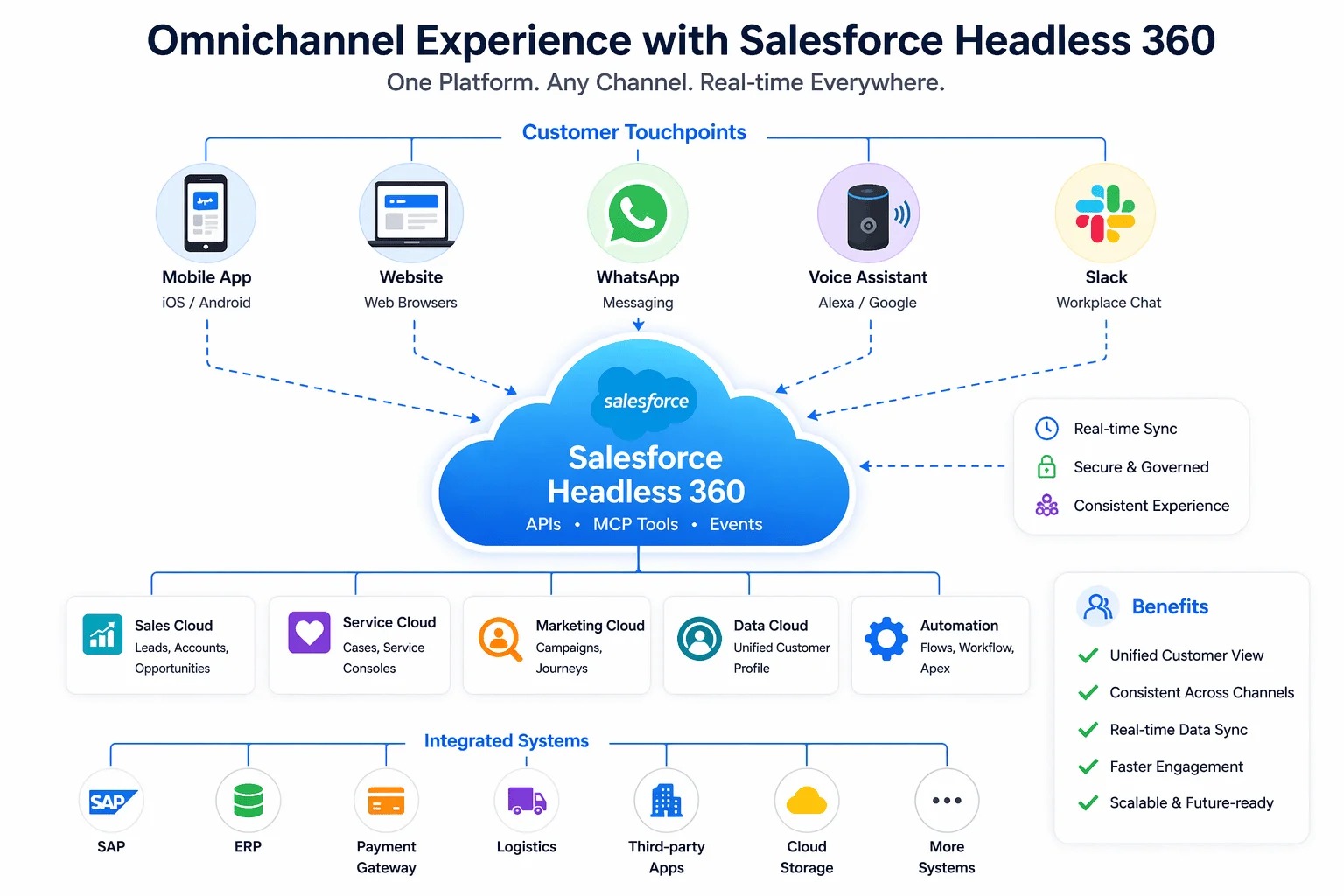
Alt text: Salesforce Headless 360 architecture connecting Salesforce capabilities with digital experiences
Note: This diagram illustrates the broader Headless 360 concept. It is not a claim that every channel shown is currently a native HXL widget deployment surface.
Connectivity is the other pillar of headless architecture. APIs let applications and systems communicate with Salesforce. MCP (Model Context Protocol) gives compatible AI clients and agents a standard way to discover and use tools.
Together they create a layered architecture: Application / AI Agent → API / MCP / Experience Layer → Salesforce Capability → Business Logic → Salesforce Data.
For developers, the question shifts from “Which Salesforce page should I build?” to “Which business capability should I expose, and which experience should consume it?”
Headless isn’t only about reading data; it works for actions too. Say a customer wants to change their delivery address.
The traditional journey: Customer Portal → Login → Order → Edit Address → Save → Confirmation.
The headless journey, designed around intent: Customer Request → AI Agent → Salesforce Capability → Validation → Business Automation → Action → Confirmation.
The customer never needs to know which object, field, Flow, or Apex class did the work. The complexity stays behind the experience. This is the essence of capability-first architecture.
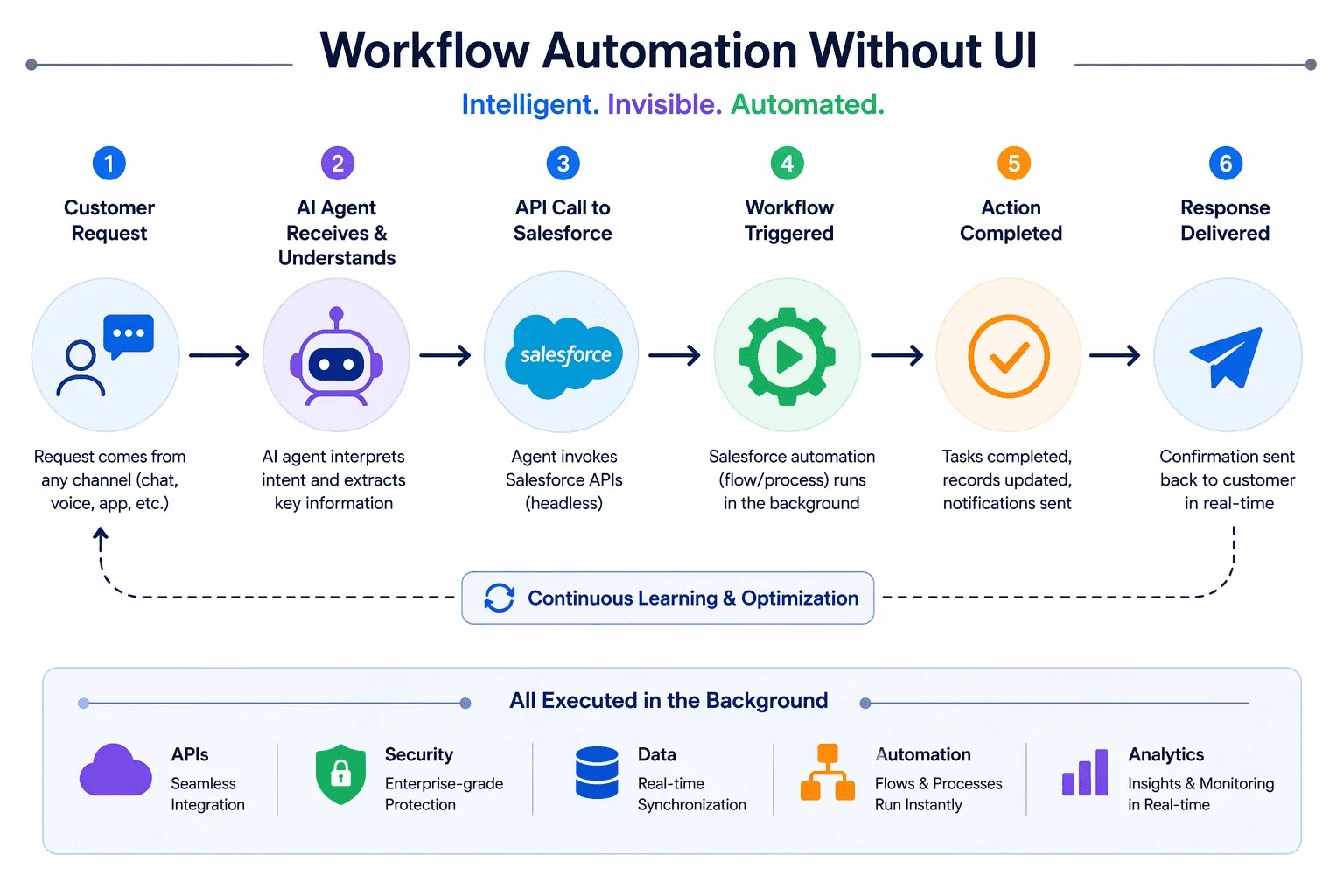
Alt text: AI agent using Salesforce business logic and automation to complete a customer request without CRM navigation
The first question enterprise customers usually ask is: “If Salesforce capabilities can be accessed outside the traditional UI, what happens to security?”
Security remains fundamental. Organizations still need to account for authentication, authorization, user and object permissions, field-level security, sharing rules, agent permissions, compliance, and auditability.
The goal is not to expose Salesforce data everywhere. It’s to expose the right capability to the right user, application, or agent, under the right security controls. That matters even more once AI agents and external applications are involved.
HXL changes how developers think about experience development. Alongside “How do I build another Salesforce screen?”, the question becomes “How do I build a reusable capability and deliver the right experience for it?”
This doesn’t make Apex, LWC, Flow, or APIs less important. It makes the architecture around them more important. Developers working on modern Salesforce experiences increasingly need to understand Salesforce APIs, Agentforce and AI agents, MCP, HXL widgets and JSON-based composition, data structures, security and authorization, testing, governance, and integration architecture.
The mindset shifts from “build a Salesforce screen” to “build a reusable capability that can power many experiences.”
Learning a new architecture is hard when you have to understand an entire enterprise environment first. The HXL Playground helps by offering a browser-based environment for exploring components, composing widgets, working with declarative JSON, and previewing experiences.
The learning path is gradual: start with a component, build a widget, add configuration, connect the data structure, and preview the experience.
uiWidgets directory, with deployment through Salesforce CLI and the Metadata API.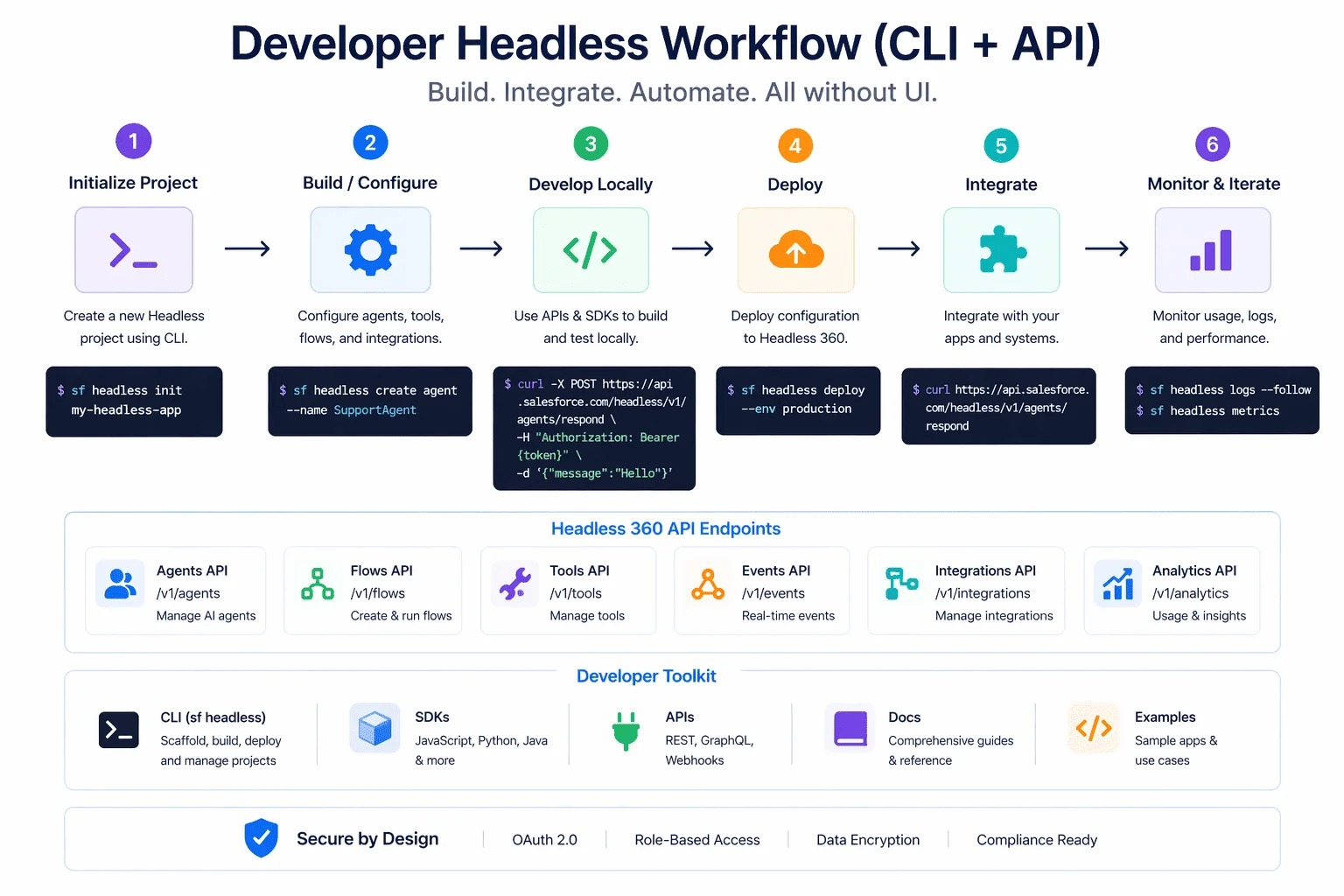
Alt text: Salesforce HXL developer workflow from widget development and testing to deployment
For business leaders, the value of headless architecture has little to do with HXL, JSON, APIs, or MCP. The real questions are: Can customers complete tasks with less friction? Can employees get information faster? Can one business capability power multiple experiences? Can AI agents safely interact with enterprise systems? Can teams stop rebuilding the same logic? Can security and governance stay consistent?
Those are the questions that determine whether headless architecture makes business sense.
Headless architecture is worth evaluating if your organization has multiple digital experiences, custom customer or mobile apps, AI-powered service, conversational interfaces, complex integrations, AI agents that need enterprise capabilities, or strong security and governance requirements.
It may be unnecessary if you primarily use Lightning Experience with standard workflows, simple internal processes, and limited integrations or external experiences. In that case, traditional Salesforce architecture may already meet your needs well.
Headless architecture should solve a real business problem, not be adopted just because it’s the latest trend.
This is the most important idea in the whole discussion. Traditional CRM thinking asks, “Where is the screen?” Headless thinking asks, “Where is the capability?”
The traditional approach is to build a screen, connect business logic, and display information. The headless approach is to build the capability, make it reusable, and deliver the right experience for each context.
Picture a service capability that knows customer information, service history, appointment details, technician data, case status, and business rules. Once built, it can serve web, mobile, conversational, employee, and AI agent experiences, with the exact implementation depending on each platform, authentication model, and channel. The principle stays the same: separate the capability from the experience.
Screens don’t become irrelevant. The Salesforce UI remains important. It simply becomes one experience among many, rather than the only front door.
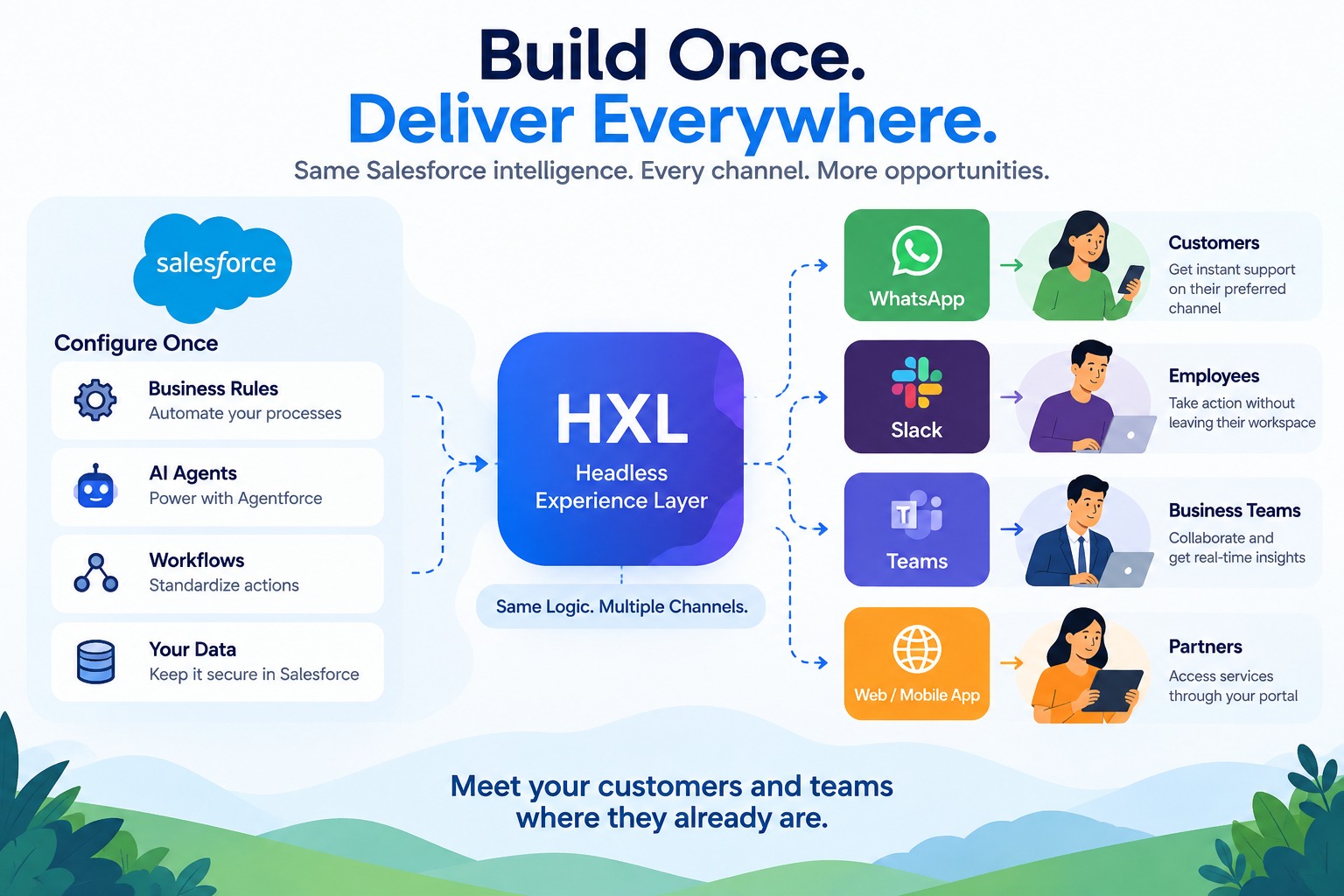
Alt text: Salesforce headless architecture enabling reusable business capabilities across digital experiences
Modern enterprise architecture increasingly connects data, APIs, automation, AI agents, business logic, and experiences. This lets AI agents work with real enterprise capabilities instead of operating as isolated chat interfaces.
A simplified stack: User → AI Agent / Application → API / MCP / Experience Layer → Business Capability → Salesforce → Data + Automation + Governance.
The AI model provides intelligence. The enterprise platform provides the business context: data, identity, permissions, business rules, automation, and governance.
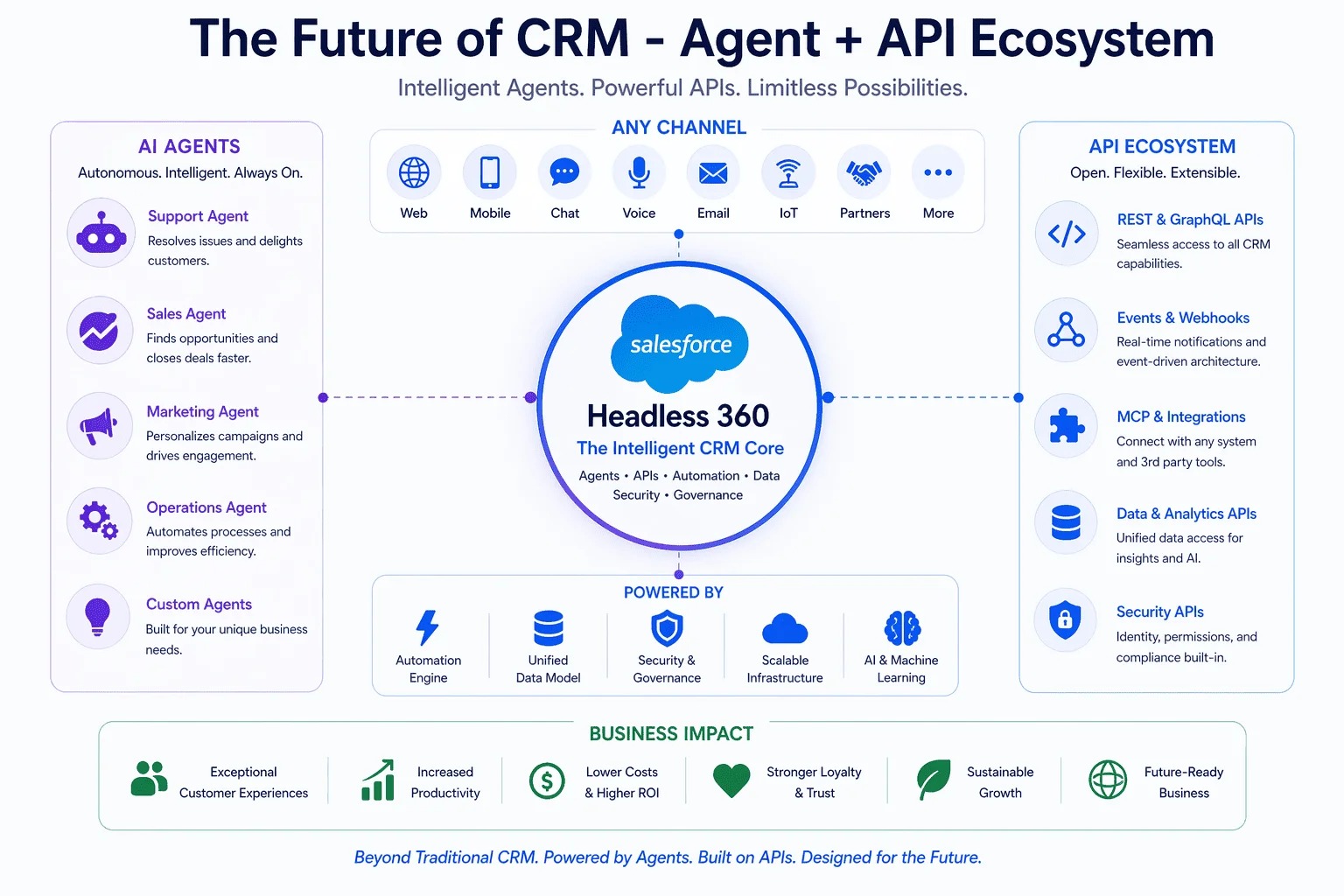
Alt text: Future of CRM with Salesforce AI agents, APIs, headless experiences and reusable business capabilities
What is the Salesforce Headless Experience Layer (HXL)?
HXL is an experience layer for building reusable rich UI experiences across supported surfaces. Salesforce currently documents HXL as a Beta capability.
Is HXL the same as Headless 360?
No. HXL focuses on the experience layer. Headless 360 is Salesforce’s broader headless architecture, spanning APIs, MCP, identity, authorization, governance, compliance, experience capabilities, and AI technologies.
Does headless CRM replace Salesforce?
No. Salesforce continues to provide data, business logic, automation, security, and governance. Headless architecture decouples the experience from the traditional UI; it doesn’t remove the platform.
What are HXL widgets?
Reusable UI compositions that present structured experiences across supported HXL surfaces.
What is the HXL Playground?
A browser-based environment for learning HXL concepts, exploring components, composing widgets, working with declarative JSON, and previewing experiences.
Which Salesforce API version supports HXL?
Salesforce currently documents HXL as available in API version 67.0 and later, as a Beta feature.
How does HXL work with Agentforce?
HXL widgets can provide rich UI experiences for supported Agentforce scenarios. Salesforce’s documentation also describes HXL widgets for supported MCP-based experiences such as ChatGPT, Claude, and Slackbot.
Is headless CRM right for every Salesforce project?
No. Organizations with multiple digital experiences, AI agents, custom applications, complex integrations, and reusable capability needs have the strongest case for evaluating it.
The biggest change headless CRM introduces isn’t technical. It’s a change in how we think about CRM.
For years, the model was: the user comes to the CRM. The emerging model is: the CRM capability comes to the experience, whether that’s an app, an AI agent, or a conversational interface. Behind it, Salesforce continues to supply what enterprises depend on: data, business logic, automation, security, governance, customer context, AI, and integrations.
Together, HXL and Salesforce Headless 360 represent a shift toward making Salesforce capabilities more composable and available wherever customers and employees are. For customers, that means less navigation and more natural interactions. For businesses, more flexible digital experiences. For developers, thinking beyond screens toward reusable capabilities, APIs, agents, and experience architecture.
The simplest way to remember it:
Don’t make the customer learn your CRM. Make your CRM understand what the customer needs.
Error: Contact form not found.
This will close in 20 seconds
