Illustre Software · Products

Know what a change will touch.
Know who touched it.

Two Salesforce products from Illustre Software. OrgLens shows you everywhere a field is used before you change it. AuditTrail records who changed, and who viewed, your data after.

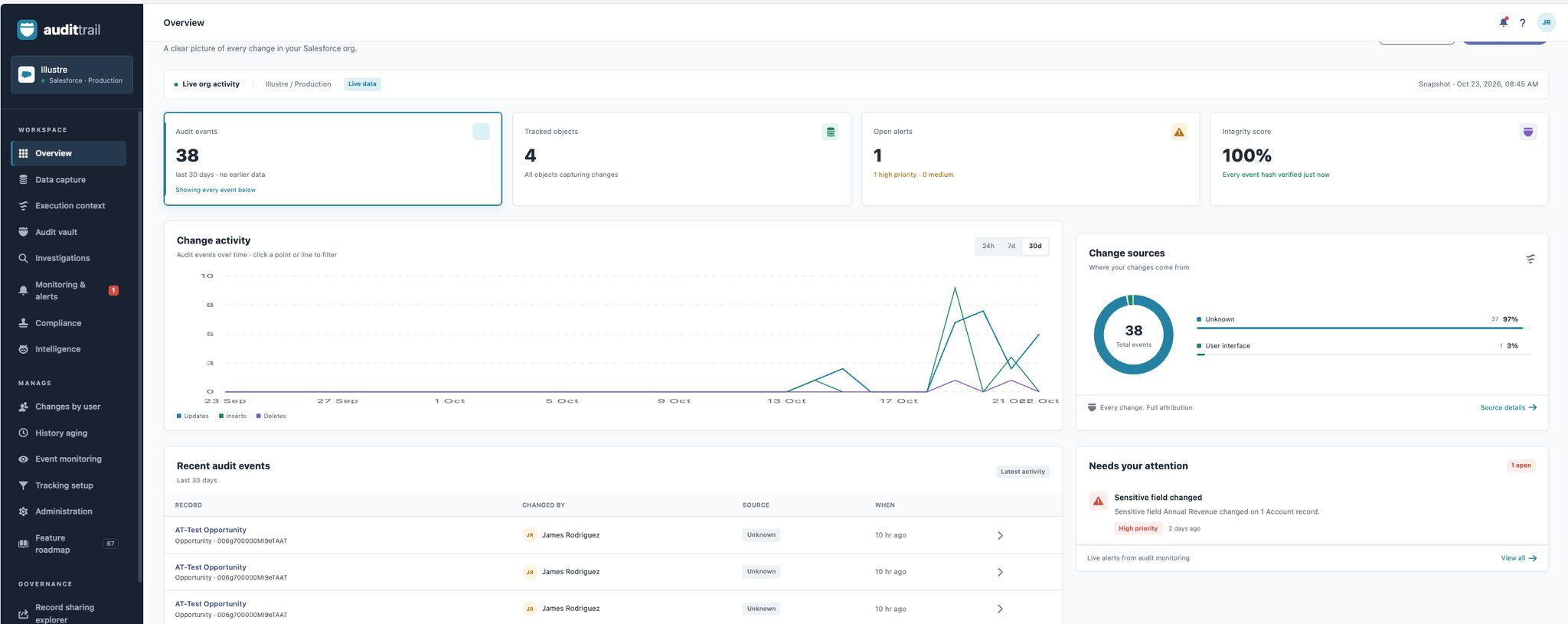
AuditTrail · Overview
AuditTrail overview dashboard showing audit events, change activity over time, change sources and recent audit events
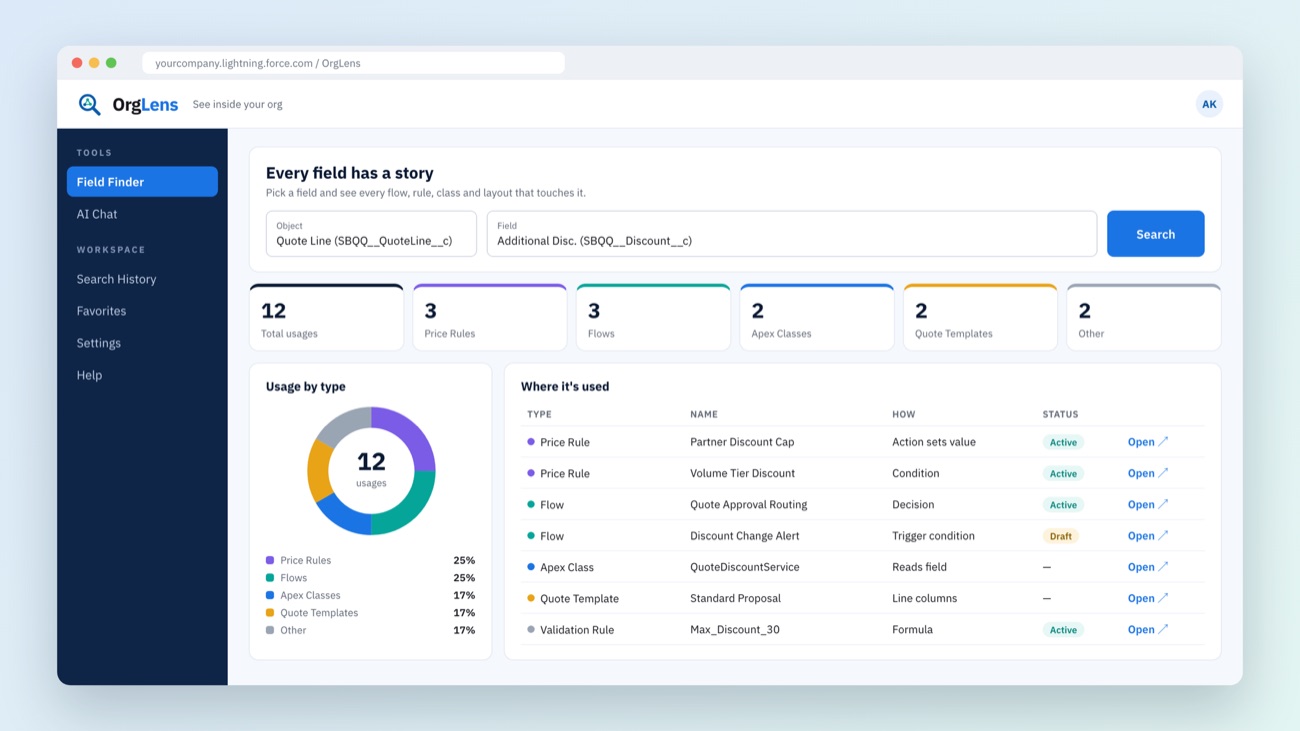
OrgLens Field Finder results listing every place a field is used
Beyond the 20-field limitAuditTrail change history
Every link opens in SetupOrgLens results
Product portfolio

Two products. One safer Salesforce org.

They answer different questions at different moments. Use OrgLens before you change something. Use AuditTrail to see what happened afterwards.

01 · Before a change

OrgLens 100% free

“Can we delete this field?”

Pick any field and OrgLens shows every flow, rule, class, layout, template and procedure that touches it, across standard Salesforce, CPQ and Revenue Cloud.

  • Field Finder: every place a field is used, each linked to Setup
  • AI Chat: ask in plain English, get the same precise results
  • Sees CPQ and Revenue Cloud logic “Where is this used?” misses
  • Installs as a Salesforce managed package
02 · After a change

AuditTrail New

“Who touched this record?”

A 100% Salesforce-native product that gives you Shield-like audit visibility: what changed, who viewed it, and how long that history is kept.

  • Change history with before-and-after values, beyond 20 fields
  • Activity monitoring: who viewed records, list views and reports
  • Retention rules org-wide or per object, then archive or delete
  • No external storage. No data leaves your org.
AuditTrail · Overview
Our product · Free Salesforce app

OrgLens — see everything your Salesforce org is hiding.

Pick any field and OrgLens shows, in seconds, every flow, rule, class, layout, template and procedure that touches it — across standard Salesforce, Salesforce CPQ and Revenue Cloud. Each result links straight to Setup.

100% freeManaged packageWorks in every Salesforce cloud
The problem

Every Salesforce change is a small gamble.

“Can we delete this field?”

Answering that usually means an hour of clicking through Setup and a dozen open tabs. Salesforce’s “Where is this used?” button helps — but in CPQ and Revenue Cloud orgs, much of the real logic lives where it never looks:

  • CPQ price rules, product rules, quote terms and the Quote Calculator Plugin
  • Quote templates, which have no API at all
  • Context definitions, pricing procedures, decision tables and configuration rules
  • Fulfillment (DRO) steps, approval rules and twin fields
Features

One search. The complete answer.

Built from years of hands-on Salesforce CPQ and Revenue Cloud delivery, OrgLens turns hours of detective work into a single search.

Field Finder

Every place a field is used, across standard Salesforce, CPQ and Revenue Cloud — with a direct link to open each item in Setup.

AI Chat

Ask in plain English — “Where is the quote discount used?” — and get the same precise results.

Global Field Search

Find any field on any object, without needing to know where it lives first.

Favorites & History

Jump straight back to the fields you work with most.

Org-Aware Results

CPQ features appear only in CPQ orgs and Revenue Cloud features only in Revenue Cloud orgs — no noise.

Built for Speed & Scale

Parallel scanning returns results in seconds — tested against orgs with hundreds of pricing procedures.

Coverage

Works in every Salesforce cloud.

You don’t need CPQ or Revenue Cloud to use OrgLens. Every org gets standard search — CPQ and Revenue Cloud orgs get even more.

Every org

Standard Salesforce

  • Flows, Apex classes and triggers
  • Validation rules
  • Formula fields
  • Page layouts
  • Approval processes
Plus

Salesforce CPQ

  • Price rules & product rules
  • Quote templates & quote terms
  • Quote Calculator Plugin
  • Twin fields
  • Advanced Approvals
Plus

Revenue Cloud

  • Context definitions
  • Pricing procedures & decision tables
  • Configuration rules
  • Qualification procedures
  • Fulfillment (DRO) steps
See it in action

From question to answer in seconds.

See OrgLens in a real Salesforce org.

Get OrgLens free
Who it’s for

Built for the people who change orgs every day.

See what a change will touch before you make it — and learn an unfamiliar org in hours instead of weeks.

Salesforce AdminsChange with confidence
ConsultantsRamp up on client orgs fast
DevelopersTrace dependencies instantly
ArchitectsPlan clean-ups and handovers
Getting started

Completely free. Up and running in minutes.

Request access

Fill in a short form and our team will get OrgLens set up for your org.

Install the package

OrgLens installs in your org as a Salesforce managed package.

Assign one permission set

Give your team access and start searching right away.

Next time someone asks “Can we delete this field?” — have the answer.

Field Finder is the first lens, not the last. Objects, automations and permissions are next on the roadmap.

New from Illustre · AuditTrail

Who looked matters as much as who changed.

AuditTrail is a 100% Salesforce-native product that gives you Shield-like audit visibility without the Shield price tag. Track every change, see who viewed what, and decide how long that history is kept.

20fields

Field History has a ceiling

Standard Salesforce tracks history on only 20 fields per object. When field #21 changes, there’s no record of who changed it or what it was before.

0edits

Viewing leaves no trace

Someone opens a sensitive Account, or exports a report full of customer data. Nothing was edited, so standard Field History shows nothing.

Shield

…is a big investment

Salesforce Shield solves this, but for many orgs it’s a lot to spend just to answer “who touched this record?”

Inside AuditTrail

Three capabilities. One complete audit picture.

Real screens from AuditTrail running in a Salesforce org. Pick a capability to see what it does and why it matters.

Change history

See exactly what changed, from what, and by whom.

What it does
Records before-and-after values for tracked fields, past the 20-field limit.
The problem
Standard Field History stops at 20 fields per object.
Why it matters
Every change has an answer: who made it and what it replaced.

Detail shown: change activity over time, where changes came from, recent audit events by user and an alert for a sensitive field change. Click to view the full screen.

Questions AuditTrail answers

The questions your team actually asks.

“Who changed Annual Revenue on this Account, and what was it before?”Change history keeps the before-and-after values.
“Who opened this sensitive record?”Activity monitoring records views, even with no edits.
“Who ran or exported that customer report?”Activity monitoring covers reports and list views.
“Can we keep Leads 60 days but Contacts 5 years?”Retention control sets rules per object.
How it works

Set it up once. Get answers from then on.

Choose what to track

Turn on tracking for the objects and fields you care about in Tracking setup.

AuditTrail records, inside your org

Changes and access activity are captured natively in Salesforce. No external storage.

Investigate and stay in control

Review events, act on alerts and let retention rules archive or delete old history.

100% Salesforce-nativeBuilt from the ground up to run in your org.
No data leaves your orgNo external storage of your audit history.
Standalone or includedAvailable on its own, or at no extra cost with our Salesforce engagements.
Next step

See them working on a real Salesforce org.

Start OrgLens for free, book an AuditTrail walkthrough, or talk to the team that built both.

Error: Contact form not found.

This will close in 20 seconds